Record (and run) at a specific location in a test
For me, the most time-consuming part after (and during) recording a test is the need to run the entire test from the beginning to the end (or until a certain point) if I need to change or update something.
More exactly, for our longer E2E tests from start to finish they can take up to 5+ minutes, and if I need to record something at the last few groups, I need to wait minutes in a row just to reach that part in order to click or update some new elements.
In the roadmap, something that would help with the above are the following two considered features:
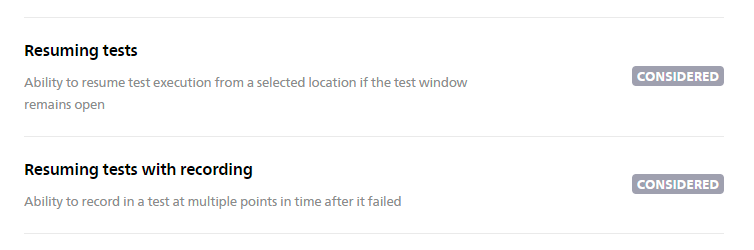
I wish that, during recording, I could "select" specific locations inside the test where the step would appear for the action I do in the recorded window. This way I could skip/ignore certain groups/components of the tests which I know are passing.
Maybe something like a "Record at location" or "Change record location" button in the recording options modal, which, when pressed, would allow me to select where my action will be recorded in the test in the form of a step.
If I was able to do something similar to that, I would be at least 50% faster if not more, while expanding our testsuite or even keeping it updated when needed. As mentioned, a big chunk of my time consists in waiting for a test to reach a certain point, so I can continue adding more steps.
I think the best parallel I can do here is the "Record at cursor" option from Playwright:
While this option is activated (and clearly marked it's on) then any action done on the webpage will be recorded
I can cancel/stop/pause the option, without closing the recording window, so that I can freely navigate the webpage elements without actually recording steps.
While the option is activated, I can also click any line number in the code editor where I want the step to be recorded
The steps are recorded in the same manner as BugBug, from top to bottom, wherever the "cursor" is at the code line at that moment
A video that captures the above behavior to get a better idea:
In my opinion, this would be the most important feature for me while using BugBug, probably above any other improvements I can think of. 😁
Log in to comment and vote
Comments27
Sep 19, 2024
PinnedOur new mechanism, “record and run from anywhere,” has been deployed with the latest BugBug Chrome extension (v. 9.0.3).
Happy testing!
Paweł Bylina
Aug 15, 2024
PinnedWe have the first working version, and I would like to ask for feedback ;)
https://www.veed.io/view/493def8f-1091-4e83-9720-2c7c083a055d?panel=share
Marius COJOCARIU
Aug 15, 2024
This is extremely exciting to see! 🤯🤯🤯🙌🙌🙌
I like the color diferentiation of the pause/recording states now for the indicator, easier to know at a glance in which mode you are on at any moment
Question:
You didn’t show this part in the video recording, but is it possible to delete and move around (change order) of steps during recording state?
Improvement idea:
Since now we will use and switch between Pause mode and Recording mode a lot more often, it would to update the bugbug modal so that we know it’s in pause:
There’s already a recording label that matches the test arrow indicator:
So maybe add one in yellow for Pause mode as well, that matches the indicator arrow in the tests, rough sketch:
Overall this looks amazing, and I can’t wait to get my hands on it once you release it.
Paweł Bylina
Aug 15, 2024
Great that you like it! ;) It took us a lot of work and probably another month of bug fixing and polishing.
It will be possible to edit steps, including deleting them and moving around in recording mode.
A nice suggestion about the Paused mode indicator! Thanks!
Wilker Augusto
Aug 19, 2024
Really like this!
Paweł Bylina
Aug 21, 2024
Awesome!
Paweł Bylina
Nov 20, 2023
@Marius COJOCARIU Thanks Marius, for such a detailed feature request. I totally agree that for longer tests this could be very annoying. Hopefully, other users will vote for this feature as well, so the priority will be increased ;)
Paweł Bylina
Apr 9, 2024
We have started working on this feature request. We'll post some user stories here to get confirmation from you, the users, that we're on the right track. Stay tuned!
Marius COJOCARIU
Apr 9, 2024
Ouhhhh yessss, I'm so excited to see this moving in progress. 😍😍😍Looking forward to the implementation!
George Pligoropoulos
Apr 10, 2024
Indeed! This is super important. Usually after first recording of scenario we need to update selectors and refactor steps. But if you have 10 groups of steps, what are you doing to do, refactor 100 steps only to realize at the end that you made a mistake and then refactor again ? Usually no. Usually you refactor a couple of groups and you hit a run to make sure you have done the correct changes. And then you refactor the next couple of groups and you execute the scenario again and so on and so forth. And you have executed the previous already robust scenario steps so many times...
This feature is a daily pain and is expected to cut off half the development time of all the QAs in the team, junior or senior.
Paweł Bylina
Apr 10, 2024
Yeah, we are experiencing the same thing, to be honest, so I definitely agree.
Wilker Augusto
Feb 9, 2024
This would save me so much time, in the same scenario.
I'm writing this comment here as I'm waiting for a long E2E execution to stop so I can continue recording my steps.
George Pligoropoulos
Feb 26, 2024
Hi @Marius COJOCARIU your suggestion is indeed awesome as we ourselves have discussed similar needs in our retrospective meetings.
However I believe we can draw here an analogy from something that already exists and these are Jupyter Notebook and if you are a Python lover you might know them already.
The very simple concept of Jupyter notebooks is that code is separated in cells, in our case are the steps of Bugbug. These cells can be executed in any order one wishes and new cells be deleted and created while the state is not being lost.
In other words the "Record at cursor" that you are referring seems like a subset of what is described in this comment. Meaning that Recording at a specific point is like adding steps in a particular place.
However while we record, which I assume we will still be able to turn on and off (pause or resume recording), it would be great to be able to execute any step or group.
First of all is it clear what is described ? You might need to play with jupyter notebooks here for this comment to make more sense: https://jupyter.org/try-jupyter/lab/
@Paweł Bylina and rest of Bugbug team you might have already envisioned something relevant. So the question is whether what it is described here will be covered from this current feature request or do we need to create a new feature request after the current one is implemented and deployed ?
Paweł Bylina
Feb 27, 2024
@George Pligoropoulos we are considering everything that @Marius COJOCARIU and you wrote here.
I imagine we could add an option to connect to the existing browser window, and then these options will be possible:
- Record at the selected position
- Perform individual steps by simply clicking on e.g. "Perform step".
- execute steps from the selected position by clicking "Execute from here".
This can be interactive, so as a user, you will be able to execute single steps, record steps, remove steps, re-record steps, etc., multiple times while connected to the open browser.
Please let me know what you think.
George Pligoropoulos
Feb 27, 2024
Yes exactly all of these would be very useful. And this would indeed allow large scenarios to be created because if you think about it the way we develop a new or update an old scenario is that at any point we have all the existing steps as a robust and green set of steps and we experiment in the current state. When we finish the current work then this become a group and then we move to another group without the need to run the scenario from the beginning. And this has been a huge advantage to whichever framework allows it. So yeah spot on. Keep up the great work.
Tegomass
Nov 27, 2023
This is so true!
Paweł Bylina
Nov 28, 2023
Thank you for the upvote! I guess that this is our next big thing to implement ;)
Paweł Bylina
Apr 10, 2024
OK, this is the short video about the process that we think should satisfy this feature request. Please let us know what you think.
https://drive.google.com/file/d/1iqtGW-3OHFXhaBiUFH1UNEdBkwWAqWEm/view?usp=sharing
Extended menu with "Paused mode" options:
Steps from the video:
Here is how we imagine the improved recording:
Let' imagine that you noticed on the list of tests that one of your your tests failed
You click the test and see test details and scroll down to the failed step
You hover over your mouse before the failed step, then click "Run and pause here", just before a failed step
The test runs locally in incognito window and pauses just before failing
Now you can click 'Edit in paused mode" in the BugBug overlay and your window switches to the test steps
You see the yellow playback marker - this is where the test is paused
You can move the marker to any position and go back to the incognito window and record new steps at this position
You can also hover between the steps and start recording at any position
Once you're done with the recording, you can continue running the test from any position you want (just move the marker and click "Resume")
You don't need to confirm the recorded steps any more, but you can still see which steps are "New" and just recorded
We are waiting for your feedback! ;)
Marius COJOCARIU
Apr 11, 2024
That looks really good! 🤩
Some questions/pointers:
A test doesn't have to fail to use the "edit in paused mode", right? It only needs to be "finished running", either fail or pass?
Would this new change basically allow the user to use the same "recording session" as much as possible, so basically lower the number of times a test needs to be executed from scratch to do modifications?
I really like the "NEW" tag for new steps, looks better than the border we have now.
I watched the video multiple times, and I think to understand it better, here's a scenario I have in mind:
I run a test locally
It fails halfway
I click "Edit in paused mode"
My recording incognito window remains open
The yellow playback marker will be positioned before the failed step in my other window with the test steps
The selector of the failed step maybe changed, so I return to my recording window and click the page element again
The new step will appear at the playback marker with the "NEW" tag before the failed step
I delete the old/failed step (while my recording window is still open)
I press the "Resume from here" while hovering before this new step
What happens next?
My recording window stays open and resumes execution from this place, before the new step I just recorded using the "Edit in pause mode"?
OR
Current recording window is closed, and a new recording incognito window is started from beginning of test and runs until the point where I clicked "Resume from" here?
I understand that this feature is for being able to select any place to record at + manage new recorded steps more easily, so I didn't expect to see the "Resume from here" button which would make recording and checking modifications even easier! I actually don't know if any other automation tool or framework even has such a capability at the moment, so this would be quite huge for you, and me as a user. 😆
If the answer to what happens next above is the first point, then I would be able to continuously resume a test multiple times during the same recording session/window, without the need to keep closing recording windows and starting executions from beginning.
(also Arasaka sucks, street kid is ❤️ )
Paweł Bylina
Apr 11, 2024
A test doesn't have to fail to use the "edit in paused mode", right? It only needs to be "finished running", either fail or pass?
Exactly. It could also be stopped manually.
Would this new change basically allow the user to use the same "recording session" as much as possible, so basically lower the number of times a test needs to be executed from scratch to do modifications?
Yes, exactly. This allows you to reuse existing sessions as much as you need without starting the test again and again.
What happens next?
Scenario number 1 - My recording window stays open and resumes execution from this place.
Yes, we have realised that this feature is unique in the market and necessary as hell, so we are excited as well ;)
Marius COJOCARIU
Apr 11, 2024
Perfeeeeect, I'm super excited! 🙌
A few further points below:
Scenario:
Test finishes
I don't press "Record from here"
I don't press "Edit in paused mode"
If I do actions on my software, are the steps being recorded by default or not?
Suggestion:
Would you consider "unifying" so to say, the BugBug record action panel?
From your video I'm reffering to these two:
If I want to navigate in my software inside the recording window without recording any steps, it seems like I need to keep toggling between those two panels.
From what I understand with the new behavior the user will be in one of the following 2 states:
Recording
Not recording
My suggestion:
Test is running/executing -> Optional: Yellow marker moves along with each step
Test finishes at a certain point (no matter if it passes or fails) -> The yellow marker stops as well after the last step executed
The recording window could display a single/"unified" panel with the following :
Passed/Fail/Error label status
Duration
Recording -> toggle button ON/OFF (ON by default)
Continue running
Assert
Hover
Inbox
Variables
If conditions
Finish & Close
With the above, the first toggle button "Recording" could replace and take the role of both the "Edit in paused mode" from first panel and the "Pause recording" from second panel, and you can end up with a single unified panel.
I want to register my actions? -> Turn the recording toggle on.
I don't want to register my actions? -> Turn the toggle off.
While taking into account not to make this modal too long because we still want to easily move it around so that it won't interfere with the usage of the user's software.
I am far from a UI expert, so what you showed so far in the video would be extremely nice in any case even with the two panels! :)
Paweł Bylina
Apr 11, 2024
If I do actions on my software, are the steps being recorded by default or not?
No, be default not.
Thanks for the suggestion! We will discuss it further ;)
George Pligoropoulos
Apr 16, 2024
I have not fully processed your proposal @Marius COJOCARIUbut i will give my perspective on a conceptual level in order to allow creativity.
So let’s see if we agree on the concepts:
The introduction of the yellow cursor improves fundamentally how you interact with BugBug.
At any certain cursor position you should be able at all times to:
Move the cursor at any position you like
Record one or more steps
Play one step
Play all next steps
Play next steps until a c
Delete any step(s) and the cursor stay at its position (as when you edit letters)
Add step in the current or next cursor position and the cursor will have no problem to play this next step
Be able to update any steps and still this will be reflected immediately.
If these are covered then all are possible.
Now how each of these are implemented is up to the UX designers to fully explore.
If BugBug team has a concern to not disrupt the current experience of the users this is totally understandable.
In that respect it makes sense to elegantly have two modes. The old one or the new one with the yellow cursor, for at least some time.
cc: @Paweł Bylina
George Pligoropoulos
Apr 11, 2024
Hi @Paweł Bylina Many thanks as this is a neat implementation indeed!
Suggestion 1:
One high priority for us would be to: Play/Execute a single step.
Meaning any step, previous or after the current cursor, on the current incognito window.
Very important for experimentation as the "Resume from here" that we can see in the new design will start playing one step after the other and this might not what we want. When you develop on a new or existing scenario, there are occasions where you want to go slowly, step by step.
Suggestion 2:
And as a nice to have but still awesome, would be the "Record here" and these extra capabilities to be available in general and not only in "Paused mode".
So imagine this scenario:
You have already opened the Incognito window manually, and you have done a couple of tricks to bring the web app to a state where it is ready to record from Bugbug Group number 10 onwards.
So you click on "Record here"
then Bugbug connects to already open incognito window (which you opened manually) <--- Is this technically possible ?
And you record Group #11, Group #12 etc.
Without ever having to wait for Groups #1 - #10 to execute in order to bring the web app in the correct state, in a slow way.
And if the above is possible to have also other options like the "Play step", "Resume from here", etc. to also be triggered immediately on the currently open incognito window that you had open manually. Namely the only thing that closes the incognito window and opens a new one would if you resumed the scenario from the beginning.
Do the above two suggestions make sense ?
Paweł Bylina
Apr 11, 2024
@George Pligoropoulos
Suggestion 1:
For this use case, you will have to:
Change the cursor position (anywhere you want)
Click "Next step"
Suggestion 2:
We've discussed this exact scenario, which adds complexity and changes the user flow. However, we have a different idea.
You will be able to achieve what you want here in the following steps:
Run and stop here - just after the first "Goto" step from your test
Do whatever you want in the opened window to bring the necessary app state
Click "Enter in paused mode"
Change the cursor position to any position you want
Click "Record from here"
Please let me know what you think.
George Pligoropoulos
Apr 11, 2024
Sure. Works for us. Many thanks
Marius COJOCARIU
Apr 11, 2024
@George Pligoropoulos awesome suggestions!
@Paweł Bylina suggestion number 1 especially would be a great quality of life as well. If I'm not mistaken Cypress/Playwright can provide this same behavior of going forward one step at a time using addons/plugins, whenever a user clicks a dedicated button, something like "Next step". Would be neat and useful indeed. :D