Manual step in tests
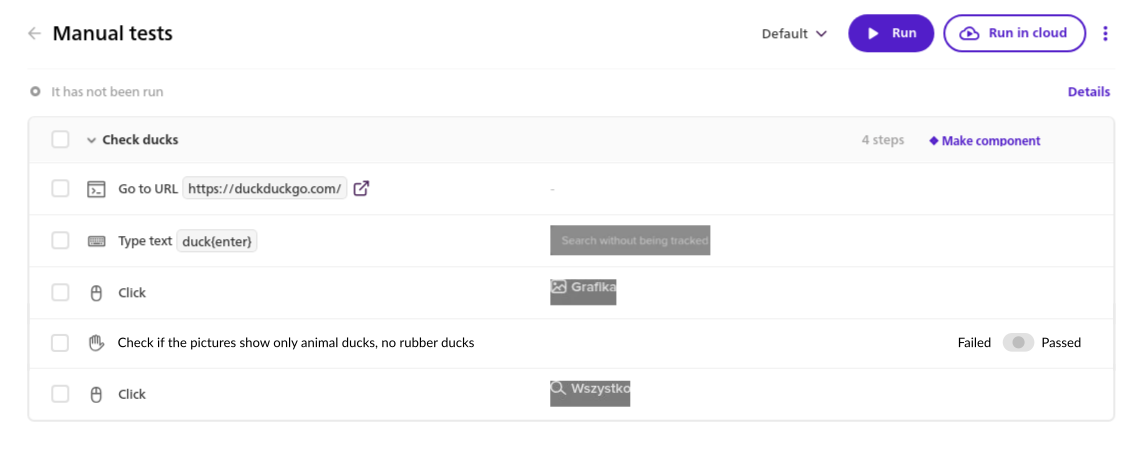
A new type of step that must be confirmed whether passes or fails manually by the user.
We are gathering interest in this idea here.
The step can be used to create a fully manual test scenario, where all steps are to be verified by the QA professional or can be used inside a regular automated test where at the certain stage the manual verification by the QA professional is necessary (e.g. is the content of the generated PDF valid).
EXAMPLE OF MIXED-CASE SCENARIO
Phase 1 — test recording
Marie starts test recording, logs into the application and navigates to analytics dashboard.
She selects the first position on the list of available metics.
She records a series of assertion ensuring proper graph headers are present on the page.
Next, she pauses the test recording and validates if all the graphs on the page contain no data gaps. She pans and zoom inside the interactive canvas-based visualization.
After confirming no data gaps are present in the graphs, she resumes the test recording.
She selects another position on the list of available metics, records a series of assertion ensuring proper graph headers are present on the page.
Next, she pauses the test recording once again and validates if all the graphs on the page contain no data gaps. Once again, she pans and zoom inside the interactive canvas-based visualization.
After confirming no data gaps are present in the graphs, she finishes the test.
Phase 2 — test editing
Now, Marie goes back to the BugBug web application to split the test into several groups and to create placeholder groups for the manual verification process for both metrics.
She adds a new manual step in the manual verification group and fills out the name: "Check no data gaps in YOY revenue graph" and provides a quick description in the step details. She repeats the process for the other metric.
Phase 3 – test run
Marie runs the test. BugBug extension goes through the previously steps and stops at the manual step "Check no data gaps in YOY revenue graph".
She validates that no gaps are present and sets the step toggle into "Passed" position.
The extension immediatly resumes replaying previously recorded step until it faces the manunal step again.
Marie repeats the procedure and after confirming the step passed, the whole test finishes with "Passed" status.
Technical requirements
step name is provided by the user
additional description can be provided in the step details
step timeout can be set by the user
step is set to passed in the cloud environment
if run via BugBug extension the popup lets user confirm if the step passed or failed
Log in to comment and vote
Comments1
Paweł Bylina
Apr 28, 2024
@Joseph Larsen please upvote here https://feedback.bugbug.io/p/manual-step-in-tests. This is the same thing, right?